 Draw Anything
How to draw a dragon
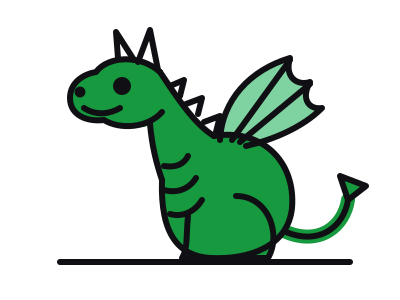
This friendly dragon is a circle head on a big round body, plus wings, spikes and a pointed tail. Six steps, each new line in pink.
Dragons are made of parts you have already seen in other animals: a horse-like snout, a lizard body, bat wings. That makes them easier than they look — you assemble them.
This cute, sitting dragon keeps the body round and compact so the wings and tail can be the stars.
What you need
- Pencil tool
- Brush
- Two greens
Opens the free canvas with each step shown faintly underneath, so you can trace your way through.
Draw along →Step-by-step: how to draw a dragon
-
1Guide shapes
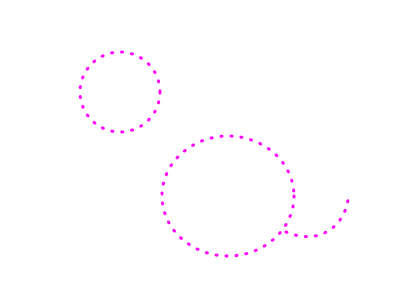
Draw a circle for the head at the top left, a large oval for the body at the bottom right, and a curving line for the tail.
-
2Head, horns and face
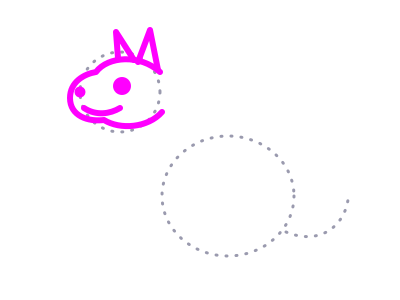
Draw a long rounded snout to the left, two pointed horns on top, an eye, a nostril and a smile.
-
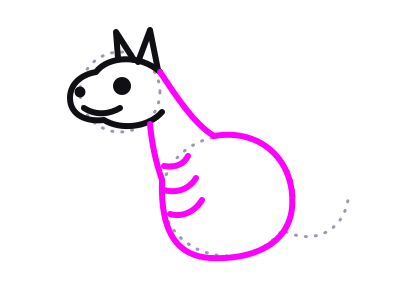
3Neck, body and belly
Run the neck down from the head to the body, then draw the round body. Add a few curved lines down the front for belly scales.
-
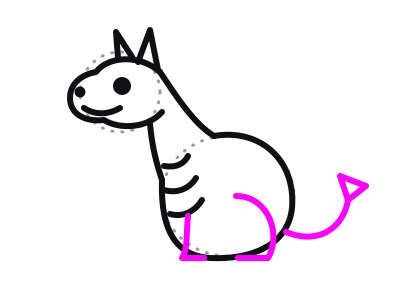
4Legs and tail
Draw a front leg and a big curved back leg, both ending on the ground. Then the tail, curving out and up to a triangle tip.
-
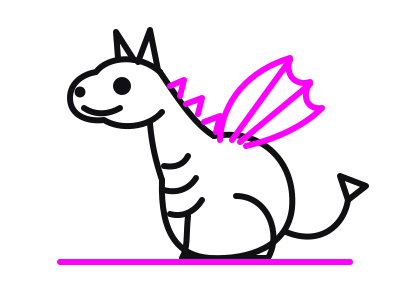
5Wings, spikes and ground
Draw a bat-like wing rising from the back with scalloped edges and two ribs. Add triangle spikes down the neck and a ground line. Erase the guides.
-
6Colour it
Green body, lighter green wing, and the same green for the tail. Purple or red dragons work just as well.
Tips for a better dragon
- Wings come from the shoulders. Attach them just behind the neck, not in the middle of the back.
- Spikes shrink towards the head. Varying their size makes them look natural.
- Round body = cute. Make it longer and leaner for a fiercer dragon.
Try a variation
Give it a puff of fire: three orange flame shapes from the nose. Or draw it on black paper with the neon canvas for a glowing dragon.
More things to draw
 Medium · 6 steps
How to draw a unicorn
See the steps Medium · 6 steps
How to draw a horse
See the steps Easy · 6 steps
How to draw a butterfly
See the steps Easy · 6 steps
How to draw a cat
See the steps Very easy · 6 steps
How to draw a star
See the stepsLevel up
Take the canvas with you
The browser studio is a taste. The app is the full art creation studio — layers, a big brush library, photo tracing, infinite colour, a new drawing idea every day, home screen widgets and timelapse sharing, on every device you own.


What you get
- Price Free to download, with an optional PRO subscription
- Includes Layers, pen, pencil, marker, crayon, watercolour, fountain pen and fill tools, daily ideas, widgets, timelapse sharing
- PRO unlocks Rainbow Pencil, Import Images, Infinite Colour, Gravity Lines
- Platforms iPhone, iPad, iPod touch and Android
- Age rating 4+
- Languages English, Spanish, French, German, Italian, Portuguese, Hebrew, Indonesian, Japanese, Korean, Simplified Chinese, Traditional Chinese