 Draw Anything
How to draw a tree
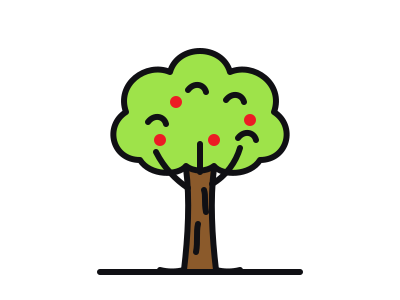
A good tree is a trunk that splits into branches, under a bumpy cloud of leaves. Six steps, each new line in pink.
The classic “lollipop” tree — a stick under a circle — is what everyone draws first. This version keeps the same simple idea but adds the two things that make a tree look real: a trunk that flares at the roots and branches that disappear into the leaves.
It is also a great tree to reuse as background in other drawings: behind a house, next to a horse, or in a row along a road.
What you need
- Pencil tool
- Brush
- Brown, green and red
Opens the free canvas with each step shown faintly underneath, so you can trace your way through.
Draw along →Step-by-step: how to draw a tree
-

1Guide shapes
Draw a tall narrow rectangle for the trunk and a big circle above it for the leaves, overlapping the top of the trunk.
-
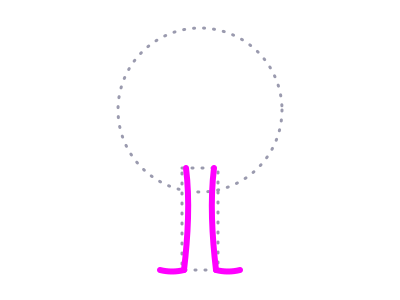
2Draw the trunk
Draw two slightly curving lines for the trunk, a little wider at the bottom, and flick each one outwards at the base to make roots.
-
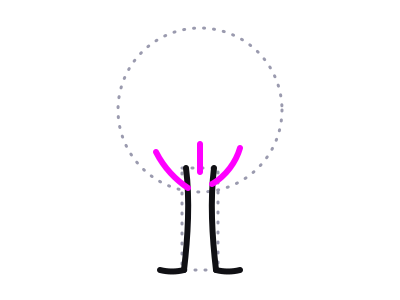
3Add branches
Split the top of the trunk into three branches — one left, one right and one up the middle. They should get thinner as they go up.
-
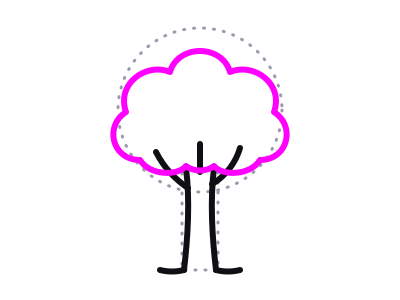
4The canopy
Draw a bumpy, cloud-like outline over the guide circle, with a scalloped bottom edge that the branches disappear into.
-
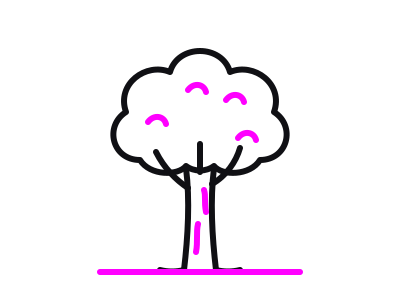
5Details and erase
Add a couple of short bark lines on the trunk, a few small curls inside the canopy for clumps of leaves, and a ground line. Erase the guides.
-
6Colour your tree
Brown trunk, bright green canopy, and a few red dots if you want an apple tree. Try orange and yellow for autumn.
Tips for a better tree
- Wider at the base. A trunk with parallel sides looks like a pole.
- Uneven bumps. Make the canopy bumps different sizes — perfect scallops look like a cloud, not a tree.
- Branches into the leaves. Let them vanish into the canopy rather than poking out.
Try a variation
For a pine tree, swap the cloud for three stacked triangles. For a winter tree, skip the canopy and keep splitting each branch into two smaller ones.
More things to draw
 Easy · 6 steps
How to draw a flower
See the steps Very easy · 6 steps
How to draw a house
See the steps Medium · 6 steps
How to draw a rose
See the steps Very easy · 6 steps
How to draw a star
See the steps Easy · 6 steps
How to draw a car
See the stepsLevel up
Take the canvas with you
The browser studio is a taste. The app is the full art creation studio — layers, a big brush library, photo tracing, infinite colour, a new drawing idea every day, home screen widgets and timelapse sharing, on every device you own.


What you get
- Price Free to download, with an optional PRO subscription
- Includes Layers, pen, pencil, marker, crayon, watercolour, fountain pen and fill tools, daily ideas, widgets, timelapse sharing
- PRO unlocks Rainbow Pencil, Import Images, Infinite Colour, Gravity Lines
- Platforms iPhone, iPad, iPod touch and Android
- Age rating 4+
- Languages English, Spanish, French, German, Italian, Portuguese, Hebrew, Indonesian, Japanese, Korean, Simplified Chinese, Traditional Chinese