 Draw Anything
Making real art on a phone
A phone is not a compromise art studio. It is a different one, with its own constraints — and those constraints push you toward the bold shapes and strong composition that make artwork read well anywhere.
Why phone art works
The obvious objection to making art on a phone is the screen size. In practice that constraint helps more than it hurts.
A small canvas forces you to work in large shapes, because fussy detail is not physically available. Large shapes are exactly what makes an image readable — and readability at a glance is what determines whether artwork survives being seen on a feed, a thumbnail or a phone screen, which is where almost all art is now viewed.
The second advantage is availability. The gap between having an idea and starting is close to zero when the studio is already in your hand. Volume of finished work matters more than the sophistication of any single piece, and phones produce volume.
The real limitation
It is not resolution or tools — it is your fingertip's precision. Every technique below works around that: paint large, trim with the eraser, and let the reference do the measuring.
The complete workflow
- Decide what the piece is about One sentence, before you open the app. “A cat sitting in a window at night.” Not “a cat.” The specificity gives you a background colour, a mood and a composition immediately.
- Find or shoot a reference Photograph the subject, or find an image. Working from reference is not a crutch; it is what most professional illustration is built on. It removes guesswork about proportion so your attention can go to the parts that are actually your decision.
- Set the canvas Background colour and orientation, chosen deliberately — see the canvas setup guide. Night scene means a dark ground. Wide scene means landscape.
- Block the composition in shapes Pencil, small size, light strokes. Where does the subject sit? How much room does it have? Fix composition here, while it is three lines and free to change.
- Lay in flat colour Marker at a large size. Big areas only, no detail. Squint — if the blurred blocks read as your subject, the piece will work.
- Add texture and depth Crayon over the flats, overlapping markers for shadow, eraser for highlights. Full technique in the painting guide.
- Commit the lines that matter Brush, medium size, fast confident strokes. Only where a line genuinely helps read the subject. Many pieces need very few.
- Detail, then stop early Small brush or pencil. Three good details beat thirty. When you catch yourself adding things nobody will notice, you finished five minutes ago.
- Export at full resolution and keep it High-resolution PNG to your camera roll. Keep every piece, including the bad ones — they are the evidence of progress.
Working from a reference photo
This is the highest-leverage technique available to a beginner, and Draw Anything PRO's Import Images is built for it. Bring a photo onto the canvas and it becomes a layer you can draw over, sketch from, or blend into the artwork.
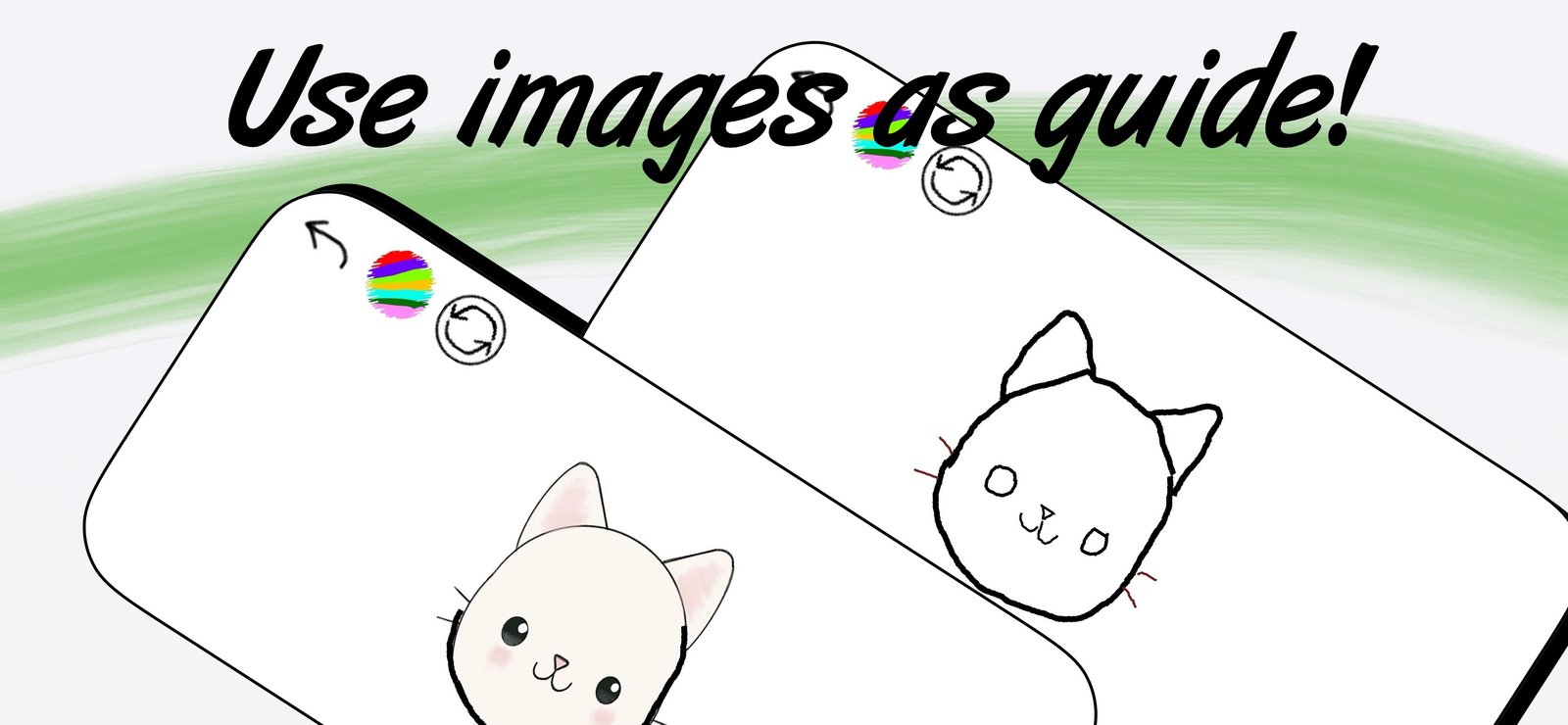
Three ways to use a reference, in increasing difficulty:
- Trace directly. Draw over the photo's edges. This teaches your hand where lines belong and is genuinely valuable for the first few weeks.
- Draw alongside it. Keep the photo visible but draw on empty canvas next to it. Now you are measuring by eye, which is the actual skill.
- Study, hide, then draw. Look at the reference for thirty seconds, remove it, draw from memory. Hardest and by far the most effective — memory forces you to understand structure rather than copy contours.
Rotate through all three. Tracing builds confidence, drawing alongside builds accuracy, and memory builds understanding.
Is tracing cheating?
No — and this question stops more beginners than almost any other.
Tracing from reference has been standard practice for centuries. Animators trace, illustrators trace, painters used projections and grids long before either existed. It is a learning tool that gives you immediate feedback about where a line should sit, which is precisely the feedback a beginner lacks.
The only genuine issue is attribution: tracing someone else's photograph and presenting the result as an original composition is a problem of honesty, not of technique. Trace your own photos, or use references openly, and there is nothing to defend.

Making art with kids
A simple drawing app is unusually good for children, for reasons that have little to do with technology:
- Nothing can be ruined. Unlimited undo removes the fear that stops children committing to a mark. This alone changes how freely they draw.
- No menus to get lost in. Pick a colour, pick a tool, draw. A child can operate the whole app within a minute.
- The crayon feels like a real material. Its broken, waxy texture is closer to what a child expects from drawing than a flat digital line.
- No mess. The entire objection to painting with a four-year-old, removed.
Draw Anything is rated 4+ and available in English, Spanish, French, German, Italian, Portuguese, Hebrew and Indonesian.
A game that works well: one person draws a shape — any shape — and the other has to turn it into something. It teaches the shape-first thinking from the step-by-step guide without it feeling like a lesson.
Building a habit that sticks
The people who improve are not the talented ones. They are the ones who finished two hundred drawings instead of agonising over four.
- Make sessions short enough to be unavoidable. Ten minutes is a session. An hour is a plan you will cancel.
- Finish badly rather than abandon well. A finished bad drawing teaches you something. An abandoned good one teaches you to abandon things.
- Attach it to something you already do. Draw while the kettle boils, on the commute, before bed. The phone is already in your hand at all three.
- Keep everything. Export every piece. In three months the folder will do more for your motivation than any amount of encouragement.
- Redraw old subjects. Drawing the same thing you drew a month ago is the clearest possible measure of progress.
Start now, not later
The free canvas on this site needs no download and no account — it is open in the tab you already have. Ten minutes is enough to begin.